FKJ20049 dashboard for Carrier X-Series: X2 / X3 / X4 (7300 7500) refrigeration unit


 Samandağ
If you decide to buy equipment at a low price, make sure that you communicate with the real seller. Find out as much information about the owner of the equipment as possible. One way of cheating is to represent yourself as a real company. In case of suspicion, inform us about this for additional control, through the feedback form.
Before you decide to make a purchase, carefully review several sales offers to understand the average cost of your chosen equipment. If the price of the offer you like is much lower than similar offers, think about it. A significant price difference may indicate hidden defects or an attempt by the seller to commit fraudulent acts.
Do not buy products which price is too different from the average price for similar equipment.
Do not give consent to dubious pledges and prepaid goods. In case of doubt, do not be afraid to clarify details, ask for additional photographs and documents for equipment, check the authenticity of documents, ask questions.
The most common type of fraud. Unfair sellers may request a certain amount of advance payment to “book” your right to purchase equipment. Thus, fraudsters can collect a large amount and disappear, no longer get in touch.
- Transfer of prepayment to the card
- Do not make an advance payment without paperwork confirming the process of transferring money, if during the communication the seller is in doubt.
- Transfer to the “Trustee” account
- Such a request should be alarming, most likely you are communicating with a fraudster.
- Transfer to a company account with a similar name
- Be careful, fraudsters may disguise themselves as well-known companies, making minor changes to the name. Do not transfer funds if the company name is in doubt.
- Substitution of own details in the invoice of a real company
- Before making a transfer, make sure that the specified details are correct, and whether they relate to the specified company.
Seller's contacts

 +90 532 288...
+90 532 288 32 85


 Turkey, Samandağ

 Turkey, Samandağ


 Turkey, Samandağ


 Turkey, Samandağ


 Turkey, Samandağ


 Turkey, Samandağ


 Turkey, Samandağ


 Turkey, Samandağ


 Turkey, Samandağ


 Turkey, Samandağ


 Turkey, Samandağ


 Turkey, Samandağ


 Turkey, Samandağ


 Turkey, Samandağ


 Turkey, Samandağ


 Turkey, Samandağ


 Turkey, Samandağ

 Turkey, Samandağ


 Turkey, Samandağ


DAF TRP LCD Display – Aftermarket | for LF / CF / XF Trucks DAF dashboard for DAF LF / CF / XF truck
Turkey, Samandağ
Aftermarket Product Notice: This is a non-OEM / aftermarket part
Product profile
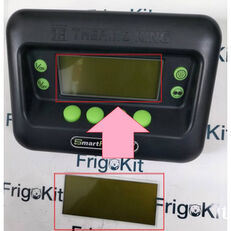
The Carrier APX LCD Display (Part No: FKJ20049
SDGG240128-01
12-00663-64
JH1229
3C.FPC.01037-01
76-50248-00-AM) is a new
replacement screen designed for Carrier Transicold APX controllers. This replacement LCD is ideal when your APX controller display no longer shows characters correctly
Note: This listing includes only the LCD display
not the full controller. Installation requires basic electronic technical skills to replace the display panel
LCD Display FKJ20049 SDGG240128-01 / 12-00663-64 / JH1229 / 3C.FPC.01037-01 / 76-50248-00-AM – Vector HE19
HE19
HE 19
H19 For Carrier Transicold APX Controllers
Technical identity
Product Overview
Application information
Compatible Models
Carrier APX Controllers (Universal)
Carrier X-Series: X2 / X3 / X4 (7300
7500)
Carrier Vector: 8500 / Solara / 8600MT
Supply information
Package Includes
1 × Carrier APX LCD Display Replacement (Part No: FKJ20049 / 12-00663-64 / JH1229 / 3C.FPC.01037-01 / 76-50248-00-AM)
Product information
Features & Benefits
Carrier APX LCD Display
Direct replacement for multiple part numbers
Restores full visibility of APX controller interface
Durable design for long-term reliability
Universal fit for Carrier APX units and compatible Vector/X-Series models
FrigoKit worldwide fulfilment
Delivery
Worldwide express shipping via FedEx or DHL
with no additional shipping charge